Geoscience expertise. Purpose-built software.

Predict well log curves from seismic attributes.

Continuous property estimates. Calibrated to geology. Tested at wells the model has never seen.

We combine supervised machine learning and geophysical interpretation to predict resistivity, density, neutron and gamma-ray logs. SeisMind brings the preparation, QC, modelling and reporting into an agent-assisted workflow.

For geoscientists, asset teams and technical decision-makers.

01 / FROM SEISMIC TO LOG RESPONSEIllustrative
Explore the section
Synthetic seismic section
RT · illustrative curves
Synthetic input curveSmoothed illustration
Generated example, not a field result or a trained-model prediction. The two panels illustrate different data domains; they are not a calibrated seismic-to-well tie.

From seismic patterns
to continuous log estimates.

01Geological calibration
02Held-out-well evaluation
03Geoscientist review

How we can help

Your subsurface question.
Our starting point.

Bring a prediction problem, a repetitive workflow or an application idea. We help define an approach your technical team can evaluate.

01 / CHARACTERISE

Reservoir characterisation with ML

Move beyond class labels to continuous log-curve estimates between wells, using seismic attributes and local well calibration.

  • Resistivity, density, neutron and gamma ray
  • Zone-aware modelling and independent checks
  • Maps, sections and well comparisons
See how we evaluate
02 / CONNECT

Agent-assisted workflows with SeisMind

Connect geoscientist intent to scientific tools, visual outputs and reports, with review at defined checkpoints.

  • Data preparation, attributes and QC
  • Prediction, visualisation and reporting
  • Local calculation with a configured AI agent
Follow the workflow
03 / BUILD

Software built around your workflow

Turn repeated technical work into a focused desktop or browser application, with the inputs and outputs your team needs.

  • Well-log viewers and data QC
  • Data conversion and technical utilities
  • Automated figures and reporting tools
Explore application ideas

Evidence before confidence

A convincing curve
is only the beginning.

Seismic does not measure resistivity directly. A supervised model learns a local association through geology, fluids and elastic response. That association must be tested.

EVALUATION DESIGNSchematic
Calibration wellsBuild & tune

Fit preparation and model choices using training data only.

Separate
by well
Held-out wellsEvaluate once

Compare predictions against logs withheld from fitting and tuning.

Counts shown are schematic. The test design, interval and geological scope are agreed for each study.

01

Match the geological setting

Check seismic ties, log quality and target zones. Similar seismic responses can correspond to different petrophysical properties.

02

Protect the independent test

Separate wells before fitting transforms or choosing models. Compare against a simple baseline and look for leakage.

03

Inspect more than one score

Read the curves alongside correlation, error, bias and geological plausibility. State the interval, scale and limits of transfer.

Meet SeisMind

The geoscientist directs.
The workflow connects.

Move from an objective to calculations, figures and a reviewable technical story. AI agents help coordinate the tools; geological judgement remains with your team.

01 / PREPARE THE INPUTS

Start with data you can trace.

Bring seismic, well logs and the project context into a consistent working setup. Check formats, units and coverage before modelling.

Geoscientist review
Confirm the input selection, target interval and intended use.

EXAMPLE OUTPUT / INPUT REGISTER
SGYSeismic volumeGeometry & sampling
LASWell logsCurves & units
ZONTarget intervalsZone definitions
Illustrative workflow view · not an application screenshot

A clear processing boundary

Local scientific work.
Configured AI assistance.

Agree the deployment and the information exchanged before a pilot begins.

LOCAL WORKSTATION
Seismic & well data
SeisMind toolsCalculations · QC · figures

Selected instructions
and tool responses

CONFIGURED AGENT / LLMWorkflow assistance

For example, Codex or Claude Code with a configured model service.

Large data volumes and calculations can remain local. A configured external agent may receive instructions and returned information; local data storage alone does not mean every interaction stays on the workstation.

Discuss a pilot
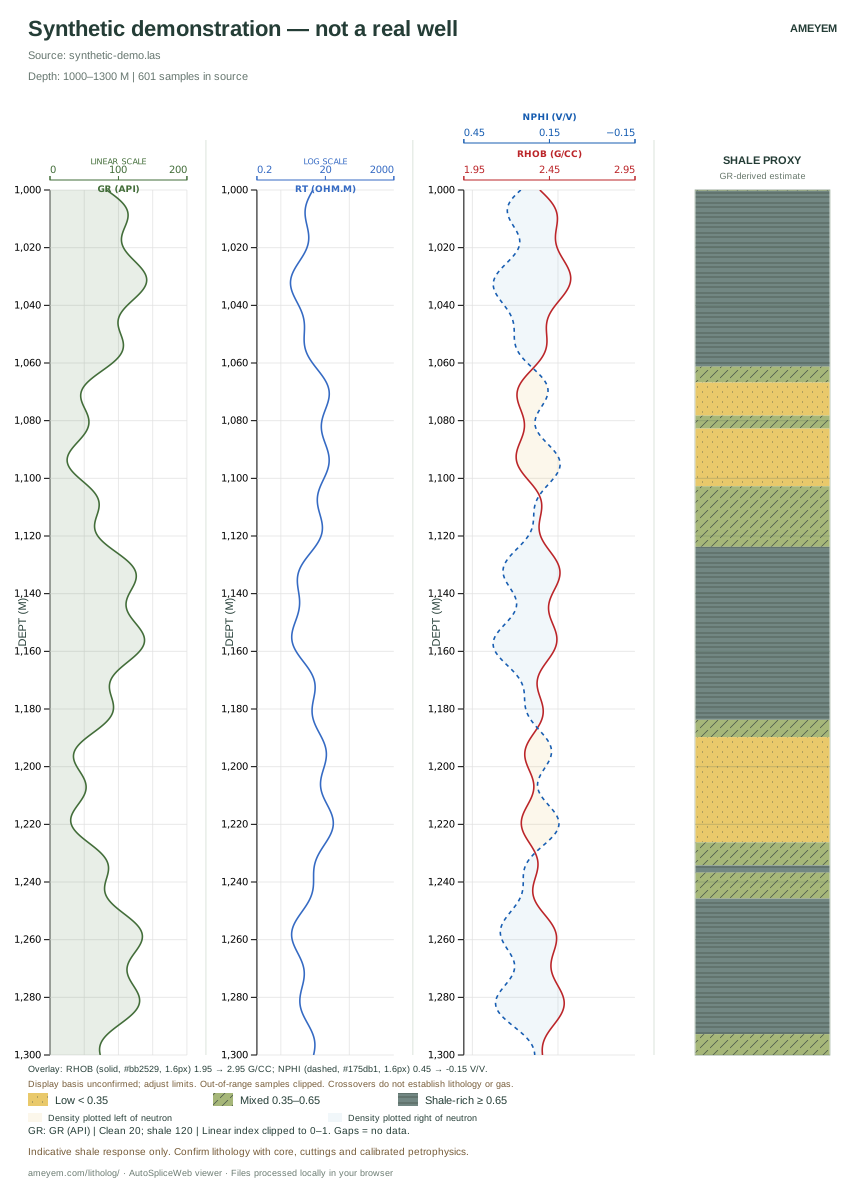
LITHOLOG STUDIO / LIVE TOOL OUTPUTSynthetic LAS
Actual Litholog Studio synthetic example: depth-aligned gamma ray, preliminary shale proxy, density–neutron overlay and resistivity.
Generated with the live browser tool

Available to use now

Your LAS file.
A clearer log.
In your browser.

Litholog Studio turns well-log data into a depth-aligned, shareable figure.

  • Choose and arrange curvesLoad LAS 1.2 / 2.0, adjust scales and intervals, and overlay density and neutron.
  • Keep the data in your browserThe tool processes your LAS locally, without an account or file upload.
  • Export for a report or the wallSave SVG or PNG, or print a paginated A3 log at 1:200 scale.
Try LAS Litholog Studio

Start with “Try a synthetic example” inside the tool. The GR-derived shale proxy is preliminary; interpretation requires geological context.

Custom geoscience applications

If the workflow repeats,
let’s make it easier.

We can scope a focused tool around a defined problem. Start with representative inputs, an expected output and a user who can judge the result.

INPUTS → INSIGHT

Log visualisation & QC

Curve displays, depth alignment and focused quality checks for the way your team reviews wells.

FORMATS → CONSISTENCY

Data conversion utilities

Repeatable conversion with explicit geometry, units and validation against an agreed sample.

ANALYSIS → DELIVERABLES

Figures & technical reports

Consistent plots, slide-ready comparisons and repeatable document generation from approved outputs.

Ameyem Geo Solutions

Geoscience comes first.
Software makes it repeatable.

Ameyem Geo Solutions Private Limited is based in Hyderabad, India, and led by Arun Babu Nalamara. Our work connects geophysical interpretation, supervised machine learning and practical scientific software.

We welcome conversations with operator teams, technical specialists and organisations looking to test a focused idea on their own data.

info@ameyem.com

Start with a technical conversation

A useful pilot starts
with a clear question.

Tell us what you need to predict, simplify or build. We’ll discuss the available data, a meaningful test and the outputs your team needs.

  1. 01
    Understand the problem

    A short discussion about the decision or workflow.

  2. 02
    Agree a scoped evaluation

    Inputs, confidentiality, success criteria, deliverables and commercial terms.

  3. 03
    Review the result together

    Assess the evidence and decide the next step.

Prefer to write directly?
info@ameyem.com

What are you working on?

Prepare an introductory email to Ameyem.

This form prepares an email on your device. It does not upload your details or send a message automatically.

Synthetic visual explanation

Continuous curves, with context.

These generated curves illustrate log displays and smoothing, not model accuracy. The dashed curves are derived from the synthetic inputs; no ML inference has run.

Illustrative interval 2400–2600 m MD. A real evaluation would use withheld measured logs, independently generated predictions, a stated interval and a baseline.

Reservoir characterisation

What a credible evaluation includes

We use supervised prediction to estimate continuous log responses from seismic attributes within a defined geological setting. A strong correlation alone does not establish a physical law or prove reliable prediction in another basin.

  1. Define the prediction target. State the zone, sampling, units, intended use and bandwidth limitations. A full-resolution-looking curve does not establish seismic resolution of thin beds.
  2. Separate the test before model selection. Hold out entire wells where feasible; fit scaling, imputation and feature selection using training data only. Keep tuning data distinct from the final blind test.
  3. Compare against a defensible baseline. Examine correlation together with error and bias, on the same interval and scale. For resistivity, declare whether fitting and scoring use RT or log₁₀(RT).
  4. Inspect the geology and failures. Review ties, facies, fluid effects, zones and out-of-domain predictions. State where the relationship is supported and where new calibration is needed.
Discuss a pilot ↗

Actual output from the live tool

Litholog Studio, synthetic example

A generated demonstration LAS, not a real well. The shale track is a preliminary GR proxy.

Full synthetic output from Litholog StudioTry the live tool ↗

Privacy & data

A clear starting point

The enquiry form prepares an email locally in your browser. It sends nothing to Ameyem until you review and send from your email app. No form details are saved by this page after it is closed or reloaded.

This page loads fonts from Google Fonts, which receives the normal connection information needed to serve them. The page has no added analytics or advertising trackers.

Litholog Studio is a separate tool with browser-local LAS processing. A SeisMind pilot has its own agreed data and deployment arrangements, including any configured external AI service.

Please keep initial enquiries non-confidential. Contact info@ameyem.com to discuss confidentiality and project data handling.